
1. Why tuples?
– Want to return more than one value from method.
– Existing options available to developers are not optimal
– Introduced tuple types and tuple literals.
– Structs – value types
– Created locally and passed by copying contents
– Are mutable.
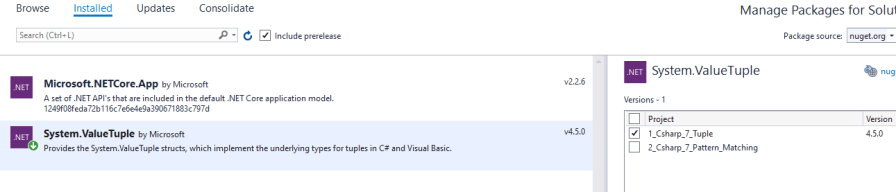
Trước tiên ta cần phải install một packet tên là System.ValueTuple như sau:
public class Chapter1
{
    public (int average, int studentCount) GetAverageAndCount(int[] scores)
    {
        // Khai báo thông thường
        // var returnTuple = (ave:0,sCount:0);
        // (int ave, int sCount) returnTuple;

        //Khai báo theo kiểu rút gọn luôn.
        (int ave, int sCount) returnTuple = (scores.Sum() / scores.Count(), scores.Count());
        return returnTuple;
    }

    public (double average, int studentCount, bool belowAverage) GetAverageAndCount(int[] scores, int threshold)
    {
        var returnTuple = (ave: 0D, sCount: 0, subAve: true);
        returnTuple = ((double)scores.Sum() / scores.Count(),
                        scores.Count(),
                        returnTuple.ave.checkIfBelowEverage(threshold));
        return returnTuple;
    }
}
public static class ExtensionMethods
{
    public static bool checkIfBelowEverage(this double classAverage, int threshold)
    {
        if (classAverage < threshold)
            return true;
        else
            return false;
    }

}

class Program
{
    static void Main(string[] args)
    {
        // Demo 1
        int[] scores = { 2, 2 };
        Chapter1 ch1 = new Chapter1();
        var (average, studentCount) = ch1.GetAverageAndCount(scores);
        WriteLine($"Average was {average} across {studentCount}");
        ReadLine();

        // Demo 2
        int[] scores = { 2, 2, 2, 2, 3 };
        Chapter1 ch1 = new Chapter1();
        int threshold = 51;
        var (average, studentCount, belowAverage) = ch1.GetAverageAndCount(scores, threshold);
        WriteLine(
            $"Average was {Round(average, 2)} across {studentCount} students. {(average < threshold ? " Class score below average." : " Class score above average.")}");
        ReadLine();
    }
}
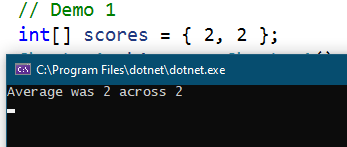
Kết quả sẽ lần lượt là

2. Pattern matching
– Can test values in different ways
– Two language constructs have bene enhanced
– They are
+ Is expression
+ Case clause in switch statements.
– Have pattern on right instead of type.
– Cause clause can now match on patterns
– No longer limited to primitive types.
namespace _2_Csharp_7_Pattern_Matching
{
    public class Chapter2
    {
        public void OutputInformation(object person)
        {
            // Nếu ta chỉ khai báo theo kiểu cũ như sau:
            // person is Student
            // thì ta cần phải tạo ra một đối tượng sinh viên từ việc ép kiểu một person trước đó.
            // Điều này cũng tương tự cho Professor.

            if (person is Student student)
            {
                //Student student = (Student) person;
                WriteLine($"Student {student.Name} {student.LastName} is enrolled for courses {String.Join<int>(", ", student.CourseCodes)}");
            }

            if (person is Professor prof)
            {
                //Professor prof = (Professor) person;
                WriteLine($"Professor {prof.Name} {prof.LastName} teaches  {String.Join<string>(",", prof.TeachesSubjects)}");
            }
        }

        public void OutputInformation2(object person)
        {
            switch (person)
            {
                case Student student when (student.CourseCodes.Contains(2)):
                    WriteLine($"Student {student.Name} {student.LastName} is enrolled for course 2.");
                    break;
                case Student student:
                    WriteLine($"Student {student.Name} {student.LastName} is enrolled for course {string.Join<int>(",", student.CourseCodes)}");
                    break;
                case Professor prof:
                    WriteLine($"Professor {prof.Name} {prof.LastName} teaches {string.Join<string>(",",prof.TeachesSubjects)}");
                    break;
                case null:
                    WriteLine($"Object {nameof(person) is null}");
                    break;
                default:
                    WriteLine("Unknown object detected");
                    break;

            }
        }
    }

    public class Student
    {
        public string Name { get; set; }
        public string LastName { get; set; }
        public List<int> CourseCodes { get; set; }

    }

    public class Professor
    {
        public string Name { get; set; }
        public string LastName { get; set; }
        public List<string> TeachesSubjects { get; set; }
    }
}

namespace _2_Csharp_7_Pattern_Matching
{
    // SCENARIO
    // Two object types:
    //      Student
    //      Professor
    // Minimize code
    // Create single method to output data from object passed to it
    // Method needs to figure out which object it is work.

    class Program
    {
        static void Main(string[] args)
        {
            Chapter2 ch2 = new Chapter2();
            Student student = new Student();
            student.Name = "Dirk";
            student.LastName = "Strauss";
            student.CourseCodes = new List<int>{3,2,5};
            ch2.OutputInformation(student);

            Professor prof = new Professor();
            prof.Name = "Reinhardt";
            prof.LastName = "Botha";
            prof.TeachesSubjects = new List<string>{"A","B"};
            ch2.OutputInformation(prof);
            ReadLine();
        }
    }
}
3. Out Variables
TryParse
– Method that tests to see if a value parse to specific type.
– If yes – returns a boolean value of true.
// Đoạn code sau sẽ giúp ta kiểm tra
// xem liệu rằng sValue có phải là một
// string có thể chuyển thành kiểu int
// được hay không, khi ta sử dụng TryParse
// sẽ không văng exception khi không convert được
// mà thay vào đó nó chỉ trả về là false thôi.
int intVal;
if (int.TryParse(sValue, out intVal))
{
    WriteLine($"{intVal} is a valid integer");
    // Do something with intVal
}

// Ngoài ra ta còn có thể xem thêm
// Các cách sử dụng của TryParse như bên dưới
#region New out variable implementation
if (int.TryParse(sValue, out int intVal))
{
    WriteLine($"{intVal} is a valid integer");
    // Do something with intVal
}

if (int.TryParse(sValue, out var intVal))
{
    WriteLine($"{intVal} is a valid integer");
    // Do something with intVal
}

var (original, intVal, isInteger) = sValue.ToInt();
if (isInteger)
{
    WriteLine($"{original} is a valid integer");
    // Do something with intVal
}
#endregion
4.Deconstruction
– Tuples can be consumed
– Simply splits tuple into individual parts
– Assigns parts to new variables
– Not only reserved for tuples
– Ensure that type has deconstructor method
Để hiểu được cách sử dụng ta xét đoạn code sau:
public class Student
{
    public string Name { get; set; }
    public string LastName { get; set; }
    public List<int> CourseCodes { get; set; }
    // Định nghĩa Deconstruct
    public void Deconstruct(out string name, out string lastName)
    {
        name = Name;
        lastName = LastName;
    }
}

class Program
{
    static void Main(string[] args)
    {
        Student student = new Student();
        student.Name = "Tim";
        student.LastName = "Nguyen";
        // Gọi ra sử dụng deconstuct
        var (FirstName, Surname) = student;
        WriteLine($"The student name is {FirstName} {Surname}");
        ReadLine();
    }
}
Khi ta chạy chương trình ta sẽ được kết quả như sau:

Deconstuction còn dễ dàng được sử dụng thông ma một tín năng của C# gọi là Extension method như sau:
public class Student
{
    public string Name { get; set; }
    public string LastName { get; set; }
    public List<int> CourseCodes { get; set; }
}

public static class ExtensionMethodClass
{
    public static void Deconstruct(
        this Student student,
        out string firstItem,
        out string secondItem)
    {
        firstItem = student.Name;
        secondItem = student.LastName;
    }
}

class Program
{
    static void Main(string[] args)
    {
        Student student = new Student();
        student.Name = "Tim";
        student.LastName = "Nguyen";
        // Gọi ra sử dụng deconstuct
        var (FirstName, Surname) = student;
        WriteLine($"The student name is {FirstName} {Surname}");
        ReadLine();
    }
}
Khi ta chạy đoạn chương trình mà implement theo cách extension method ta cũng nhận được kết quả tương tự

